The Windows Processes and Threads 20
The Child Process Program Example
The following is the code for the child process. It uses the inherited handles for STDIN and STDOUT to access the pipe created by the parent. The parent process reads from its input file and writes the information to a pipe. The child receives text through the pipe using STDIN and writes to the pipe using STDOUT. The parent reads from the read end of the pipe and displays the information to its STDOUT.
Create a new empty Win32 console application project. Give a suitable project name and change the project location if needed.

Then, add the source file and give it a suitable name.
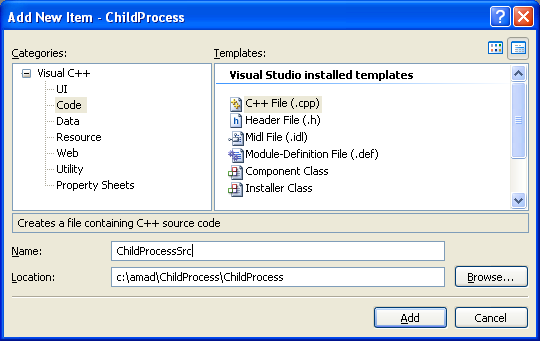
Next, add the following source code.
// This program not intended to be run independently
// It is used by the parent program
#include <windows.h>
#include <stdio.h>
#include <strsafe.h>
// Prototype
void ErrorExit(PTSTR);
// Constant
#define BUFSIZE 4096
int wmain(int argc, WCHAR **argv)
{
WCHAR chBuf[BUFSIZE];
DWORD dwRead, dwWritten;
HANDLE hStdin, hStdout;
BOOL bSuccess;
// Get the standard input and output handles
hStdout = GetStdHandle(STD_OUTPUT_HANDLE);
hStdin = GetStdHandle(STD_INPUT_HANDLE);
if((hStdout == INVALID_HANDLE_VALUE) || (hStdin == INVALID_HANDLE_VALUE))
{
ErrorExit(LChild: GetStdHandle());
ExitProcess(1);
}
else
wprintf(LChild: GetStdHandle() for standard output handle is OK!\n);
// Send something to this process's stdout using printf.
wprintf(L\n ** This is a message from the child process. ** \n);
// This simple algorithm uses the existence of the pipes to control execution.
// It relies on the pipe buffers to ensure that no data is lost.
// Larger applications would use more advanced process control.
for (;;)
{
// Read from standard input and stop on error or no data.
bSuccess = ReadFile(hStdin, chBuf, BUFSIZE, &dwRead, NULL);
if (!bSuccess || dwRead == 0)
{
ErrorExit(LChild: ReadFile());
break;
}
else
wprintf(LChild: ReadFile() from standard input is OK!\n);
// Write to standard output and stop on error.
bSuccess = WriteFile(hStdout, chBuf, dwRead, &dwWritten, NULL);
if(!bSuccess)
{
ErrorExit(LChild: WriteFile());
break;
}
else
wprintf(LChild: WriteFile() to standard output is OK!\n);
}
return 0;
}
// Format a readable error message, display a message box, and exit from the application.
void ErrorExit(PTSTR lpszFunction)
{
LPVOID lpMsgBuf;
LPVOID lpDisplayBuf;
DWORD dw = GetLastError();
FormatMessage(
FORMAT_MESSAGE_ALLOCATE_BUFFER |
FORMAT_MESSAGE_FROM_SYSTEM |
FORMAT_MESSAGE_IGNORE_INSERTS,
NULL,
dw,
MAKELANGID(LANG_NEUTRAL, SUBLANG_DEFAULT),
(LPTSTR) &lpMsgBuf,
0, NULL );
lpDisplayBuf = (LPVOID)LocalAlloc(LMEM_ZEROINIT, (lstrlen((LPCTSTR)lpMsgBuf)+lstrlen((LPCTSTR)lpszFunction)+40)*sizeof(WCHAR));
StringCchPrintf((LPTSTR)lpDisplayBuf, LocalSize(lpDisplayBuf) / sizeof(WCHAR), L%s failed with error %d: %s, lpszFunction, dw, lpMsgBuf);
MessageBox(NULL, (LPCTSTR)lpDisplayBuf, LError, MB_OK);
LocalFree(lpMsgBuf);
LocalFree(lpDisplayBuf);
ExitProcess(1);
}
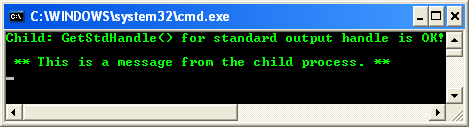
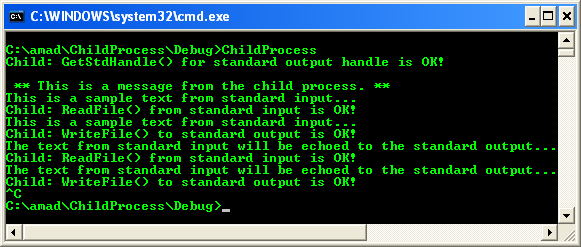
Build the project. This program should be used for the previous example. However when you type some text and press Enter key, the text will be echoed to the standard output. Press Ctrl+C to quit.
< Processes & Threads 19 | Win32 Process & Thread Programming | Win32 Programming | Processes & Threads 21 >