The Windows File Management 11
Adding Users to an Encrypted File Program Example
The following code sample adds a new user to an existing encrypted file by using the AddUsersToEncryptedFile() function. It requires the user's EFS certificate (from the Active Directory) to exist in the Trusted People user certificate store. This sample adds a new Data Recovery Field to the encrypted file. As a result, the newly added user can decrypt the encrypted file. The caller must already have access to the encrypted file, either as the original owner, the data recovery agent, or as a user who was previously added to the encrypted file. This example is not supported in Windows 2000 because you cannot add multiple users to an encrypted file.
Create a new empty Win32 console application project. Give a suitable project name and change the project location if needed.

Then, add the source file and give it a suitable name.

Next, add the following source code.
// Adds a user to an encrypted file example
#include <Windows.h>
#include <malloc.h>
#include <stdio.h>
#include <wincrypt.h>
#include <winefs.h>
// A safer version for string manipulation
#include <strsafe.h>
// Link with the following libraries
#pragma comment(lib, Advapi32.lib)
#pragma comment(lib, Crypt32.lib)
// A prototype that receives a function name, displaying
// system error code and its respective message
void DisplayErrorBox(LPTSTR lpszFunction);
// Utility function that outputs this application's usage instructions.
void Usage(LPWSTR wszAppName)
{
wprintf(L\n%s: Adds users to encrypted files.\n, wszAppName);
wprintf(LUsage:\t%s <file> <username> <subjectname>\n\n, wszAppName);
wprintf(L\t<file> is the name of the file\n);
wprintf(L\t<username> is the name of the user's account\n);
wprintf(L\t\tExample: for name@example.com, use \name\\n);
wprintf(L\t<subjectname> is the \IssuedTo\ name on the );
wprintf(Lcertificate\n\t\tfrom the TrustedPeople store.\n);
exit(1);
}
// void ErrorExit(LPWSTR wszErrorMessage, DWORD dwErrorCode);
void wmain(int argc, WCHAR *argv[])
{
LPWSTR wszFile = NULL;
LPWSTR wszAccount = NULL;
LPWSTR wszSubject = NULL;
PSID pSid = NULL;
DWORD cbSid = 0;
LPWSTR wszDomain = NULL;
DWORD cchDomain = 0;
SID_NAME_USE SidType = SidTypeUser;
HCERTSTORE hStore = NULL;
PCCERT_CONTEXT pCertContext = NULL;
PENCRYPTION_CERTIFICATE pEfsEncryptionCert = NULL;
PENCRYPTION_CERTIFICATE_LIST pEfsEncryptionCertList = NULL;
DWORD dwResult = ERROR_SUCCESS;
// Simple check whether to explain usage to the user.
if(argc !=4)
{
Usage(argv[0]);
}
// TODO: Check the parameters for correctness.
wszFile = argv[1];
wszAccount = argv[2];
wszSubject = argv[3];
// First, look up the user's SID using the specified account name.
// Call LookupAccountName twice; first to find the size of the
// SID, and a second time to retrieve the SID.
LookupAccountName(NULL,wszAccount,pSid,&cbSid, wszDomain, &cchDomain,&SidType);
if(cbSid == 0)
{
DisplayErrorBox(LLookupAccountName());
exit(1);
}
else
wprintf(LLookupAccountName() looks fine!\n);
pSid = (PSID)malloc(cbSid);
if(!pSid)
{
DisplayErrorBox(Lmalloc());
exit(1);
}
else
wprintf(LSID allocated successfully!\n);
wszDomain = (LPWSTR)malloc(cchDomain * sizeof(WCHAR));
if(!wszDomain)
{
DisplayErrorBox(Lmalloc());
exit(1);
}
else
wprintf(Lmalloc() for domain name looks fine!\n);
if(!LookupAccountName(NULL,wszAccount,pSid,&cbSid, wszDomain,&cchDomain,&SidType))
{
DisplayErrorBox(Lmalloc());
exit(1);
}
else
wprintf(LLookupAccountName() looks fine!\n);
// Obtain the user's certificate.
// Search the TrustedPeople store for the specified subject name.
// Anyone who has encrypted a file on the computer has an
// encryption certificate placed the TrustedPeople store by the
// system. It is likely that the user has a matching private key.
hStore = CertOpenSystemStore( (HCRYPTPROV)NULL,LTrustedPeople);
if (!hStore)
{
DisplayErrorBox(LCertOpenSystemStore());
}
else
wprintf(LCertOpenSystemStore() looks fine!\n);
pCertContext = CertFindCertificateInStore(hStore,
X509_ASN_ENCODING | PKCS_7_ASN_ENCODING,
0,
CERT_FIND_SUBJECT_STR,
(VOID*)wszSubject,
NULL);
if(!pCertContext)
{
DisplayErrorBox(LFindCertificateInStore());
exit(1);
}
else
wprintf(LFindCertificateInStore() looks fine!\n);
// Create the ENCRYPTION_CERTIFICATE using the cert context and the user's SID.
pEfsEncryptionCert = (PENCRYPTION_CERTIFICATE)malloc(sizeof(ENCRYPTION_CERTIFICATE));
if(!pEfsEncryptionCert)
{
DisplayErrorBox(Lmalloc());
exit(1);
}
else
wprintf(Lmalloc() for structure looks fine!\n);
pEfsEncryptionCert->cbTotalLength = sizeof(ENCRYPTION_CERTIFICATE);
pEfsEncryptionCert->pUserSid = (SID *)pSid;
pEfsEncryptionCert->pCertBlob = (PEFS_CERTIFICATE_BLOB)malloc(sizeof(EFS_CERTIFICATE_BLOB));
if(!pEfsEncryptionCert->pCertBlob)
{
DisplayErrorBox(Lmalloc());
exit(1);
}
else
wprintf(Lmalloc() cert blob allocated!\n);
pEfsEncryptionCert->pCertBlob->dwCertEncodingType = pCertContext->dwCertEncodingType;
pEfsEncryptionCert->pCertBlob->cbData = pCertContext->cbCertEncoded;
pEfsEncryptionCert->pCertBlob->pbData = pCertContext->pbCertEncoded;
// AddUsersToEncryptedFile takes an ENCRYPTION_CERTIFICATE_LIST;
// create one with only one ENCRYPTION_CERTIFICATE in it.
pEfsEncryptionCertList = (PENCRYPTION_CERTIFICATE_LIST)malloc(sizeof(ENCRYPTION_CERTIFICATE_LIST));
if(!pEfsEncryptionCertList)
{
DisplayErrorBox(Lmalloc());
exit(1);
}
else
wprintf(Lmalloc() - structure allocation looks fine!\n);
pEfsEncryptionCertList->nUsers = 1;
pEfsEncryptionCertList->pUsers = &pEfsEncryptionCert;
// Call the API to add the user.
// Adds user keys to the specified encrypted file.
dwResult = AddUsersToEncryptedFile(wszFile,pEfsEncryptionCertList);
if(dwResult == ERROR_SUCCESS)
{
wprintf(LThe user was successfully added to the file.\n);
}
else
{
DisplayErrorBox(LAddUsersToEncryptedFile());
}
// Clean up all allocated resources
if(pSid)
{
wprintf(LFreeing up the SID...\n);
free(pSid);
}
if(wszDomain)
{
wprintf(LFreeing up the domain name...\n);
free(wszDomain);
}
if(pCertContext)
{
wprintf(LFreeing up the CertFreeCertificateContext...\n);
CertFreeCertificateContext(pCertContext);
}
if(hStore)
{
wprintf(LClosing the cert store...\n);
CertCloseStore(hStore,CERT_CLOSE_STORE_FORCE_FLAG);
}
wprintf(LFreeing up other allocated resources...\n);
if(pEfsEncryptionCertList)
{
// Just free up the allocated storage pUsers[0]
//if (pEfsEncryptionCertList->pUsers)
// {
if(pEfsEncryptionCertList->pUsers[0])
{
if((pEfsEncryptionCertList->pUsers[0])->pCertBlob)
free((pEfsEncryptionCertList->pUsers[0])->pCertBlob);
free(pEfsEncryptionCertList->pUsers[0]);
}
// free(pEfsEncryptionCertList->pUsers);
// }
free(pEfsEncryptionCertList);
}
wprintf(LThe program ran to completion without error.\n);
exit(0);
}
void DisplayErrorBox(LPTSTR lpszFunction)
{
// Retrieve the system error message for the last-error code
LPVOID lpMsgBuf;
LPVOID lpDisplayBuf;
DWORD dw = GetLastError();
FormatMessage(
FORMAT_MESSAGE_ALLOCATE_BUFFER |
FORMAT_MESSAGE_FROM_SYSTEM |
FORMAT_MESSAGE_IGNORE_INSERTS,
NULL,
dw,
MAKELANGID(LANG_NEUTRAL, SUBLANG_DEFAULT),
(LPTSTR) &lpMsgBuf,
0, NULL );
// Display the error message and clean up
lpDisplayBuf = (LPVOID)LocalAlloc(LMEM_ZEROINIT, (lstrlen((LPCTSTR)lpMsgBuf)+lstrlen((LPCTSTR)lpszFunction)+40)*sizeof(WCHAR));
StringCchPrintf((LPTSTR)lpDisplayBuf, LocalSize(lpDisplayBuf) / sizeof(WCHAR), L%s failed with error %d: %s, lpszFunction, dw, lpMsgBuf);
MessageBox(NULL, (LPCTSTR)lpDisplayBuf, LError, MB_OK);
LocalFree(lpMsgBuf);
LocalFree(lpDisplayBuf);
}
To test this program, it is better to run it in a domain based, active directory environment. In the following test, we just run it on standalone Windows XP Pro.
Firstly, we create a word file, testfilencrypt.doc.

Next, we invoke the file's property page. Click the Advanced button.

Tick the Encrypt contents to secure data tick box and click OK.

Then click the OK button.

Select Encrypt the file only and click OK.

Then click the Advanced button again.

Click the Details button.

The certificate for user mike spoon (in this case, the logged user) will be created using local certificate store. Manually we can add other user, click the Add button.
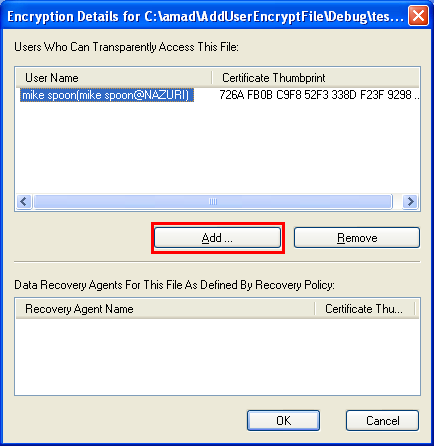
In this case we have another user which having a valid local store certificate.

Just click the Cancel button but for the following screenshot, click OK button.

In Windows, the encrypted file is shown in green colour.

Next, run the program.

We are adding a user Johnny (also has a local certificate) to testfilencrypt.doc which owned by mike spoon.

Finally, let verify the task. The user seems was added successfully and it is bad if the purpose is misused!

< Windows Files 10 | Win32 Programming | Win32 File Index | Windows Files 12 >