Debugging ReactOS 3
|
|
The topics covered in this session are:
Com0com and VirtualBox Configuration for Serial Debugging
In this section we will try to configure virtual serial ports and ReactOS for debugging. Firstly, launch the com0com console setup.
We will rename the default given port name. For the available commands, you can type help.
To view the default given virtual ports, issue list command.
|


Or as you can also rename the port to the desired name using the GUI setup. In this case we rename to COM31 (CNCA0) and COM32 (CNCB0) respectively. Click the port existing port name field/box and rename it.

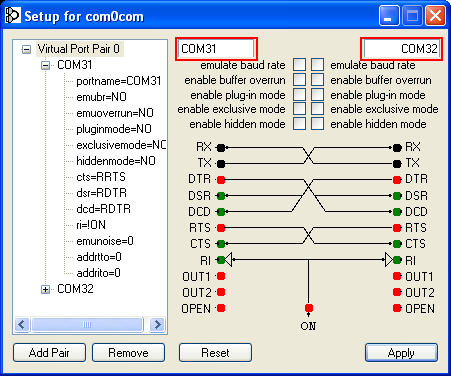
Then you can verify the changes using the console setup.

If you want to rename the port using console setup, run the com0com command shell and type:
install PortName=COM31 PortName=COM32

The changes should be visible in Windows Device Manager.

Next, go to the VM settings. Launch VM and click Settings icon/menu.

In the Guest Settings (ReactOS) for Serial Ports set as follow:
-
Port1: Checked
-
Port Number: COM1
-
Port Mode: Host Device
-
Port/File Path: \\.\COM31
